Global Marketing Plus

Tips and Tricks for Small Business Success
Subscribe

Archive for the ‘Marketing’

With the economy struggling, acquiring new customers is top of mind for most companies.

June 25, 2008 By: Ron Coleman Category: Marketing, SEO

Did you know that 50-70% of consumer and business purchases start with a search engine like Google?

If your website doesn’t appear at the top of a search engine results page (sponsored ads or organic search results), you’re losing potential customers to companies that rank higher.

What can you do? Over the next several blogs, I’ll share with you my top strategies and tactics that can help you acquire new customers via search engine optimization and advertising.

So check back on a regular basis to find new posts.  If you want to add our blog to your feeds to keep current on posts,  click Entries (RSS).

10 Business Card Blunders That Hurt Business

June 19, 2008 By: Ron Coleman Category: Marketing

You don’t have to be a Fortune 500 company to have an effective business card that captures attention and inspires someone to want to know more about you and what you offer.

By being aware of these ten common blunders and making sure you avoid them, you’ll have a business card that gets noticed and increases your number of referrals and customers.   by Laurie Hayes

Read article “10 Business Card Blunders That Hurt Business
 

How To Invite A Depression

June 19, 2008 By: Ron Coleman Category: Humor, Marketing

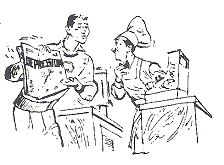
A man lived by the side of the road and sold hot dogs. He was hard of hearing so he had no radio. He had trouble with his eyes so he read no newspapers.

But he sold good hot dogs.

He put up signs on the highway telling how good they were.

He stood by the side of the road and cried: “Buy a hot dog, Mister!” And people bought.

He increased his meat and bun orders. He bought a bigger stove to take care of his trade. He got his son home from college to help him.

But then something happened…

His son said, “Father, haven’t you been listening to the radio? There is a terrible depression on. The European situation is terrible. The Domestic situation is worse.”

Whereupon the father thought, “Well, my son’s been to college, he reads the papers and he listens to the radio, and he ought to know.”

So the father cut down on his meat and bun orders, took down his advertising signs, and no longer bothered to stand out on the highway to sell hot dogs.

And his hot dog sales fell almost overnight. “You’re right son,” the father said to the boy, “We certainly are in the middle of a great depression.”

Organizing Cards after an Event

June 13, 2008 By: Ron Coleman Category: Marketing

When I attend a big event I collect a lot of business cards.  I often do not have time to enter the information to my contact database immediately, especially if I attend several networking events in a short amount of time.  So I put the collected cards into an envelope immediately after the event and label the envelope with the name, date and location of the event.

When I am ready to enter the details into my database I do three things:

1.  On the back of each business card I write the event, date and location.

2.  I enter the information in a file titled “Place of Contact”. This allows me to do more focused marketing.  A group visiting the same event probably has similar business interests.

3.  I email each person whose card I collected.  I mention where we met, briefly explain our products and services and tell them where to find more information on my website.  I even create different email address books for each event I attend.

Email Tip #12. Know when email doesn’t work

June 10, 2008 By: Ron Coleman Category: Email Marketing, Marketing

Pick up the phone instead…

Email remains one of the primary ways that businesses communicate internally among their staff, and externally with their customers, suppliers and other stakeholders.

However, make sure you recognize when email is losing its effectiveness. It’s easy to hide behind email when we don’t want to speak to a scary client or team member. I’ve been guilty of that as well when I have a million things going on. But sometimes a three minute conversation can clear up the confusion inherent in five days of back-and-forth email messages.

Email Tip #11. Use Folders & Filters

June 05, 2008 By: Ron Coleman Category: Email Marketing, Marketing

If you’re like me and you receive a lot of email, you can use folders to store messages from different people or clients.

In most email programs, you can set up automatic rules (often called filters) that will place all messages from Joe into a specific folder.

That way you can review all of the messages Joe sends over to you, reply to the ones that need attention, and not have to spend the time moving the messages from the inbox to another folder when you’re finished. All of the messages addressed to info@globalmarketingplus.com, for example, go to a different folder that I don’t check as often, because people who send to that address are usually trying to sell me something.

This one strategy has made me amazingly more efficient at dealing with the large volume of email I receive each day (usually about 650 messages per day).

Email Tip #10. Paste Links & Get on the Same Page

June 04, 2008 By: Ron Coleman Category: Email Marketing, Marketing

How many times have you felt that the person receiving your email just isn’t on the same page as you? A lot of times it’s literally true. You might be thinking that they are looking at one page on a website, when in fact they are looking at something completely different. I know I’ve been frustrated by this in the past.

Simple pasting a link into an email is the best strategy. Again, it seems simple, but it can mean the difference between confusion and clarity.

It’s also easy to do, and takes very little time. In your browser, simply copy the website address (i.e. www.GlobalMarketingPlus.com) and paste it into the body of the email message. On a PC, the Control-C shortcut will copy; the Control-V will paste.

Sending someone the exact link to the website page you are discussing gets everyone on the same page.

Email Tip #9. Strong Call to Action

June 02, 2008 By: Ron Coleman Category: Email Marketing, Marketing

A strong call to action can make the difference between someone glancing at your message or actually doing something with it. In this busy world, sometimes it helps to be direct.

In direct marketing or email correspondence, most of the time you want someone to take a specific action when they receive your message. You might want to set up an in-person meeting, or have them click through to a website to read more. Or respond back and say, “Yes, let’s go ahead with the project.”

The most effective email messages always have a strong call to action, telling the recipient what you want them to do.

I’m sure you’ve received long, rambling emails from people. And by the time you get to the end, you don’t really know what you’re supposed to do (if anything). Is this a message that is just nice to read and have for future reference? Or do they want me to actually do something?

Email is a low context medium. It doesn’t transmit behavioral clues like voice inflection that might otherwise indicate what you want a person to do. So it’s important to be direct and ask what you want the other person to do. It sounds basic, but it’s a key to effective email.

Email tip #8. Always include your contact information

May 29, 2008 By: Ron Coleman Category: Email Marketing, Marketing

If you’re like me, you’re often jumping in an out of meetings or appointments. In between, you have a couple of minutes to return a couple of phone calls, so how do you choose which people you’ll call back first? 

Often the decision is made for me… so make sure your messaging is as effective as possible.

I can’t tell you how many times I’ve not returned a call promptly because I didn’t have someone’s contact information readily available.

I’m sure you’ve had the same experience. Someone emails you to please call them or you just want to call them. But they didn’t give you a phone number, and there isn’t one listed in their signature line. You then have to dig through past emails, look in your address book, Google them, and still you aren’t able to find their direct line.

In this age of iPhones, Blackberries and cellphones, it’s rare that I have a phone number memorized. 

I don’t even have my adult children’s phone number memorized because all I have to do is enter their speed number code and my cell phone dials their number for me.  If I get caught without my cell phone or the battery dies, there is no way I can call them!

I know this is a simple and basic thing. But so many people don’t follow it. If you want someone to respond to you, you’ve got to make it as easy as possible for them.  The same thing goes for leaving a voice mail.

So many people rush through their phone number, making it virtually impossible to write down the number without having to go back and listen to their message a couple of extra times. Ideally, you should always give your phone number, say it slowly, and repeat it twice so that someone can write it down and then make sure it’s correct.

Effective emails always include a signature line with contact information. You should include your contact information in every new message or every message you reply to.  This is just good common marketing sense!

I have a friend that has a knack for being able to memorize things like long lists of phone numbers and license plates.

But for the rest of us who have off-loaded our ability to remember phone numbers to our electronic brains, this strategy will help you make sure your calls are returned.

Email Tip #7. Personalize Each Message

May 19, 2008 By: Ron Coleman Category: Email Marketing, Marketing

Personalization works. According to many recent research studies, email messages that are personalized have stronger message open and clickthrough rates.

Everyone likes being called by their name. In this impersonal world of email messages, people like to know that you know who they are, and that you care about them as a person.

Nothing is worse than a highly demanding email that is sent without being addressed to someone by name and is out of context. A message that starts: “Can you make these changes ASAP?” puts you on the defensive right way. You might think: Why should I care if they are in a hurry?

It’s so much nicer to have a message that begins with: “Ron – I hope you’re doing well. I just found out that we’re going to be mentioned on the front page of The Wall Street Journal tomorrow. Can you make these changes ASAP?”

Wow. I’m much more willing to help someone who personalizes the message to me, and gives me a non-threatening reason why this needs to really be done by tomorrow.