
Does a blog help your website?
I have had many ask me: “A blog is a lot of work. Does it really help my website? Even if nobody reads it?”
I recently received proof that a blog does help…
I have had many ask me: “A blog is a lot of work. Does it really help my website? Even if nobody reads it?”
I recently received proof that a blog does help…
For many websites, Search Engine Optimization is one of those “good things to do.” Kind of like running, or eating a healthy diet. But how do you know it’s working?
How do you know if your search engine optimization is working?
One of the biggest mistakes companies make when writing copy for a site is using industry terms that normal customers don’t think to use.
Archeology, of course, is the systematic method to uncover artifacts from the past that have been buried or forgotten.
What archeologists do is examine artifacts that were lost and buried, and draw conclusions about how life was lived hundreds or thousands of years ago.
When people search online, it’s a lot like sifting through thousands of years of junk and broken pieces of pottery in order to find the one intact tablet that solves your mystery.
If you’re like me, you often see a lot of non-relevant results returned when you do a web search. Google, as good as it is, isn’t perfect. You scan down the page, looking for the answer to your question. And then you suddenly see a link to a site that matches exactly what you’re looking for.
Reverse archeology, applied to the Web, is a process that allows you to plant key information for people to find and discover.
How does the process of reverse archeology work? Essentially you come up with keywords that your target audience is likely to use in a keyword search, and then you create relevant content on your site. When prospective customers “digs” through the mass of web pages in a Web search, they can find your site quickly and easily.
Reverse archeology is a different type of mindset for generating website content, but one that can be extremely successful.
Next week, we’ll discuss a unique new way to optimize your site when you have visitors coming in from a search engine.
Google’s continuing mission is to deliver the best search results possible to its end users. So how can a search engine like Google differentiate between a company that is brand new (and might be a fly-by-night operation) versus an organization that has years of experience in the field? The answer: Google looks at the age of your domain name (along with several other varibles). If your domain name was registered last week, chances are good that your site won’t even appear in Google’s rankings for several months. (This is called the Google Sandbox.) But if your domain name was registered eight years ago, Google uses this information as a clue that you’ve been around for a little bit. In a nutshell, Google looks at the month and year when your domain was registered — and uses this to give more weight to companies that have been around for several years versus several weeks. Google also looks forward to see how long you have registered your domain; if you have registered your domain for five or ten years in the future, you’ve made a subtle, yet important economic decision that you’re still going to be around and in business in 2018. Here’s an instance where being frugal with domain name registration can actually hurt your rankings. That said, Google does place more weight on the past versus the future. So, what can you do to increase your rankings? First, make sure that your company’s domain name is registered for at least a few years from the present date. Second, make sure you know who is the contact person for your domain name. We’ve recently seen several instances where the person in charge of the domain name moves to a different organization, goes on vacation, or even passes away. And then, if the domain name comes up for renewal, it can be a mad scramble to keep your website and corporate email up and running. |
 |
|
|
If you’re not sure of the age of your domain name, please let me know, and I’d be happy to have our team take a quick look.
Thanks,
Ron
Even though search engines can’t read words inside graphics, they do use the name of the file and other contextual information to increase your rankings. One of the biggest missed opportunities is not naming images with search engine optimization in mind.
I can’t tell you how many times I see a site that has the logo named: logo.jpg
While that’s sufficient to display the logo in a browser, it’s much better to name the logo with descriptive keywords, such as: global-marketing-plus-logo.jpg (notice I seperated the words with an “-”. This lets search engines read the words. If I named the logo as: globalmarketingpluslogo.jpg, that is not a word and search engines will not recoginize it as a word).
If you want to further increase the relevancy, you can create a folder (also with keywords) that can help you increase keyword density on a page.
For example, placing an image in a directory like this will give you more relevancy than in a more non-descriptive folder:
/search-engine-optimization-services/seo-services-header-logo.jpg
Yes, it takes a little bit more time and effort for someone to type out a longer image name and keep it organized into different folders on your website.
But our research has found that increasing the relevant keywords in your images is a sure fire way to increase your search engine rankings.
Let me know if you need help with website development or email marketing.
Ron
We’ve discussed local search, and how to make sure you don’t confuse search engines with graphics and flash animation. We’ve also talked about the all-important title tags.
This week, we’ll take a higher-level view to discuss what search engines look for when ranking your site.
At the end of the day, a search engine is in business to help you find the most relevant results possible when you conduct a search. Search engines make their money by selling relevant advertising to supplement the natural, organic search results.
Because a top ranking in Google or another search engine can translate into a great deal of business, it’s important to know how search engines determine who gets placed at the top of the list.
The two biggest ways search engines rank you are based on:
Relevant Content: Search engines are really good at reading text. The more relevant copy you have on your site, the better chance you have getting your page indexed. Search engines love pages that have more than 500 words of text on them.
Why? A page with a lot of content is usually more beneficial to the end user. (Though for every rule like this one, there are many exceptions.)
Adding articles, press releases, detailed information about your products and services all can help quickly increase the amount of relevant content that you have on your site.
Inbound Links: The more sites that link to you, the more important your site becomes to search engines. If sites that link to you are very relevant and/or important, those inbound links worth more. And domains that end with .gov, .edu often perform better than .com for inbound links.
It’s kind of like a high school popularity contest. If the most popular kids all point to you and say that your website is better than anyone elses, in the eyes of the community, your ranking is elevated.
There are many other things as well that affect search engine ranking. I can’t go into great detail for the entire list, but even small changes can translate into higher rankings.
Title Tags: See last week’s email.
Page Names: Keywords in page names in crease the relevance of the search and are displayed in a Google search result.
Image Names: Putting relevant keywords into image names helps your ranking.
Alt Text for Images: If you hover over an image, this is the text that appears; also used by the blind to understand what an image represents.
Keyword Density: How often specific keywords appear on a page as a percentage of all of the words on a page.
Section Headings: In the HTML code, section headings like H1 or H2 are treated as more important content than the information on the rest of the page.
Words contained in links: A link like: “Global Marketing Plus offers Web Marketing and Search Engine Optimization Services” can help boost rankings.
Clean HTML code: Search engines are easily confused if your websites’ code is a mess.
How often pages are updated: Search engines like new conent, but also have a bias toward pages that have been up on the web for a long time.
Site Map: If you have a site map (and an XML site map as well), it’s easier for search engines to crawl through all of the pages of your site.
Keywords in your domain name.
The age of your domain name: Older domain names are perceived as more relevant than something registered last week.
Keywords in subdomains
(i.e. email.globalmarketingplus.com)
Keywords in file directory structures
(i.e. globalmarketingplus.com/email)
In the coming weeks, I’ll delve into many of these points in more detail. Let me know if you’d like me to discuss specific areas, or if you’d like to discuss your site with our team.
One of the most cost-effective ways to boost your search engine performance is to make sure that the title tags on your website are set up properly. When you search in Google, the search results start with a blue underlined link.
Here’s an example:
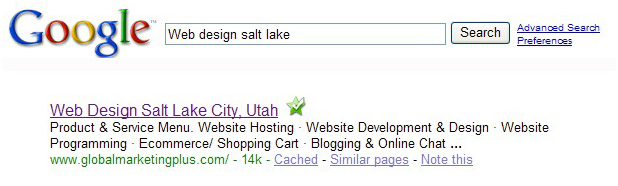
What displays in the first line of the website listing is usually what is contained in the title tag of a web page. The keywords you placed in the search box are usually boldfaced in the search results.
So, just what is a title tag, and why does it matter for search engine positioning?
According to the World Wide Web Consortium, the Title tag was designed to help people “identify the contents of a document.” When people view individual web pages out of context (often via search), context-rich page titles help tell the visitor a summary of the page.
Instead of a title like “Home”, which doesn’t provide much contextual background, web designers should supply a title such as “Introduction to HoN3 Model Railroads” instead.
Google and other search engines use these rich contextual clues as a way to hone its search results.
On a web page, the title tag is part of the HTML code. Here’s what the code looks like on Global Marketing Plus’s site:
<title>Website Design, Development, Email Marketing, Content Management, PHP programming Salt Lake City, Utah</title>
Most end users won’t see the title tag. But if you remember back to my email tip about subject lines, the title tag is what a subject line is to an email campaign: It entices the end user to pay attention and open the page to read more.
Top Five Most Common Mistakes for Title Tags:
1. Untitled: When many of the popular programs create a new HTML page, it puts ’Untitled’ into the title tag. It’s up to the Web designer to change this… and since most users don’t see it, sometimes they forget to change it.
2. No Title Tag: Like the “Untitled” tag, another key mistake is simply leaving out the title tag. If you do a view source (Internet Explorer: View —> Source), and the title tag appears like:
<title></title>
… then you don’t have a title tag.
3. “About” Tag: Another common mistake for title tags is to have the title tag refer to a section of your website. But a title tag that reads, “About” doesn’t tell me much about what the company or website is “About.” Instead, have it read:
<title>About the Company: Website Development & Marketing, Email Deployment, and PHP
programming</title>
This is sure to get more keywords into the title tag, and if you’re searching for a company, you instantly know what they do.
4. Company Name In Title Tag: If you want your company name, we recommend putting your company name at the end of the title tag so it doesn’t dilute the effectiveness of the keywords.
5. Same Title Tag on Multiple Pages: You should have a unique title tag for each page of the site. Why? As each page is unique, you should have a title tag that describes it’s unique content.
I hope you found this search engine strategy helpful. Changing the title tags on a site is a quick, fast and easy way to increase search engine positioning. Let me know if you’d like us to take a look at your site and make recommendations for you (at no charge).
This next strategy for Search Engine Optimization is often overlooked. But it’s key to making sure that people can find you at the top of the page when they conduct a search in Google, Yahoo or another search engine.
Search engines are really good at reading text. But they’re very easily confused. And if Google gets confused when it crawls through your site, you won’t rank very high in search results.
Search engines, for example, can’t read words that are contained in graphics or flash animation. So if your company’s name is only contained in a graphic on your site, this content is ‘invisible’ to a search engine. Same thing goes for product or service names.
Some designers will tell you that Google can now read flash and you can use it all you want. However, even Google suggests you be careful and avoid it!
The root of the problem lies with graphic designers. Graphic designers are really good at building graphics, but, unfortunately, they sometimes don’t know how to create SEO-friendly design.
Most websites, however, are designed by graphic designers who are really good at building graphics, and less interested in Search Engine Optimization (SEO). It takes more time to have content placed in text, and use a stylesheet to format it so that a search engine can read it. Especially when it’s so easy to create a good looking graphic in Photoshop.
Here’s an example of a graphic:

By formatting using text and a cascading stylesheet (CSS), I can make it look exactly the same. However, search engines can read the text version much easier!
Here’s an example of a site that uses all flash (and is invisible to search engines).
While it looks pretty to humans, to Google the content is completely invisible. Here’s how the site appears to Google in its text cache. (You can see that there is no text or content that appears.)
Now here is a non-flash version of a simular page. In this case, the intention was not to copy the first page exactly. If that were the purpose, this page would look almost the same as the first!
Even if you’re not worried about organic search positioning, but are doing paid search engine marketing (like Google Adwords), it’s important that the content on your site is easily digested by a search engine.
Why? Google Adwords ranks the pages on your website, and compares it to your keywords and ad copy. The more relevant Google ranks the text on your site, the less you’ll have to pay for a sponsored ad on Google (and the higher your position).
In Summary: Don’t confuse search engines by keeping your content ‘locked up’ in graphics. It’s a small little detail in the web design process, but one that will pay dividends for a long, long time with increased search results.
I hope you enjoyed this search engine strategy. Let me know if we can help you with your web marketing or search marketing needs.
For businesses that serve specific geographic regions (i.e. Salt Lake City, Utah), you can create search engine ads in Google and Yahoo that only appear to people in your area.
How does this work? A search engine like Google uses a computer’s IP address and other information to discover where someone is searching (including city and state).
Why does Google care where a person is located? Google’s mission is to give their end users the best search results possible. So, if I need someone to mow my lawn in Bountiful, Utah, it does me little good to receive a paid search result from New York (Maybe not even from Provo, Utah, just 60 miles away)!
Thus Google (and the others) tries to match search results to the geographic location of the person searching.
How does Google make money? Google gives businesses and organizations the ability to display paid advertisements (sponsored results) on search results pages. These ads are triggered by keywords you choose (more on this in a different strategy).
You don’t have to pay for your ad to display; you pay Google only when someone clicks on your ad. The technical term is Pay Per Click (PPC) advertising. The more relevant your ad (more on this later), the less you have to pay for specific keywords, and the higher up you will appear in the sponsored advertising results.
Local Search PPC Ads. In Google Adwords, you can create an advertising campaign that will target someone in a specific city or state. You can even specify a 5, 10 or 25 mile radius from a specific location (like your retail showroom or office). Below your local ad, Google will place the name of your local area (i.e. Salt Lake City, Utah)… making it more likely that someone searching in your area will choose your organization vs. an out-of-town competitor.
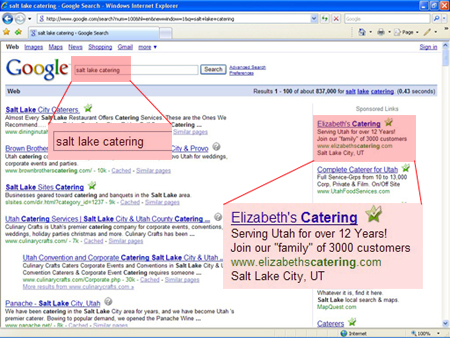
Local PPC Ads are usually a more cost effective option than a national search engine advertising campaign. As a general rule of thumb, the more geographically targeted and specific you can be, the less money you’ll need to pay to acquire new customers. And make sure you have conversion tracking code placed on your site, so you can measure and track how much you’re paying for each new customer via local search engine advertising.
Please let me know if we can help you acquire new customers through search engine optimization or search engine advertising.
 Global Marketing Plus was started to help small businesses compete on the same level as large corporations but for a lot less expense.
